This site uses third-party website tracking technologies to provide and continually improve our services, and to display advertisements according to users' interests. I agree and may revoke or change my consent at any time with effect for the future.
Mobile device management (MDM) software has evolved from a nice-to-have into a $20.44 billion market and critical pillar of IT infrastructure. As workforces become increasingly distributed and 82% of organizations now permit employee-owned devices on corporate networks, IT teams are tasked with securing, managing, and optimizing devices they often can't physically touch. The challenge isn't just deploying MDM; it's choosing the right platform, integrating it into your broader governance stack, and extracting measurable ROI.
This guide walks you through the fundamentals of MDM, the features that matter most, and how to connect mobile device data to identity governance and SaaS optimization. Whether you're evaluating your first MDM or migrating from a legacy system, you'll find actionable frameworks and real-world insights to inform your decision.
What is mobile device management software (MDM software)
Mobile device management software is a centralized platform that allows IT teams to configure, secure, monitor, and manage mobile devices across an organization, regardless of location or ownership model. MDM solutions provide remote control over smartphones, tablets, laptops, and even IoT devices, enabling IT to enforce security policies, deploy applications, and respond to threats in real time.
At its core, MDM addresses a fundamental tension: empowering employees with mobile flexibility while maintaining enterprise-grade security and compliance. Modern MDM platforms go beyond basic device tracking; they integrate with identity providers, conditional access engines, and SaaS management tools to create a unified governance layer.
For IT Directors managing hybrid workforces, MDM is the connective tissue between endpoint security, identity management, and application control. It's not just about locking down devices; it's about creating a frictionless, secure experience that scales.
How MDM works across iOS, Android, Windows, and macOS
MDM platforms leverage native operating system APIs to manage devices without requiring invasive third-party agents. Here's how it works across major platforms:
iOS and iPadOS: Apple's Device Enrollment Program (DEP) and Apple Business Manager enable zero-touch enrollment. IT teams can configure devices over-the-air before employees ever power them on. Supervision mode unlocks advanced controls like app whitelisting and single-app kiosk mode.
Android: Android Enterprise (formerly Android for Work) provides a containerized work profile that separates corporate and personal data. IT can manage the work profile without touching personal apps or files. Zero-touch enrollment is supported for devices purchased from participating carriers.
Windows: Windows Autopilot integrates with Azure AD and Intune to streamline provisioning. Devices ship directly to employees and automatically enroll in MDM during the out-of-box experience. Group Policy Objects (GPOs) can be translated into modern MDM policies.
macOS: Automated Device Enrollment (ADE) ties devices to your MDM upon purchase. User-approved MDM enrollment ensures transparency, while FileVault integration enables remote encryption key escrow.
Cross-platform MDM solutions normalize these OS-specific mechanisms into a unified management console, allowing IT to apply consistent policies across device types.
Core MDM features IT teams need
Not all MDM platforms are created equal. Here are the non-negotiable features that separate enterprise-grade solutions from consumer-focused tools:
Remote lock and wipe
When a device is lost, stolen, or an employee departs, remote lock and wipe capabilities are your last line of defense. Modern MDM platforms allow IT to selectively wipe corporate data without touching personal files on BYOD devices. This granular control is critical for compliance with data protection regulations like GDPR and CCPA.
Zero-touch enrollment
Zero-touch enrollment eliminates the need for manual device setup. Devices are pre-configured and automatically enroll in MDM the moment they connect to the internet. This reduces IT overhead, accelerates onboarding, and ensures no device escapes governance. For distributed teams, it's the difference between shipping a ready-to-work laptop and fielding dozens of setup calls.
Policy-based app deployment
IT teams need the ability to push, update, and remove applications based on user role, department, or device type. Policy-based app deployment ensures employees have the tools they need without manual intervention. It also enables IT to blacklist risky apps and enforce approved software catalogs.
Conditional access controls
Conditional access ties device compliance to resource access. If a device falls out of compliance, say, it's jailbroken or missing a critical security patch, MDM can automatically revoke access to corporate email, cloud apps, or VPN. This dynamic enforcement model is a cornerstone of zero-trust security architectures.
Real-time inventory and reporting
Visibility is the foundation of control. MDM platforms should provide a real-time inventory of all managed devices, including OS version, installed apps, battery health, and compliance status. Advanced reporting dashboards surface trends, flag anomalies, and generate audit-ready documentation for compliance reviews.
Connecting MDM data to identity governance and license optimization
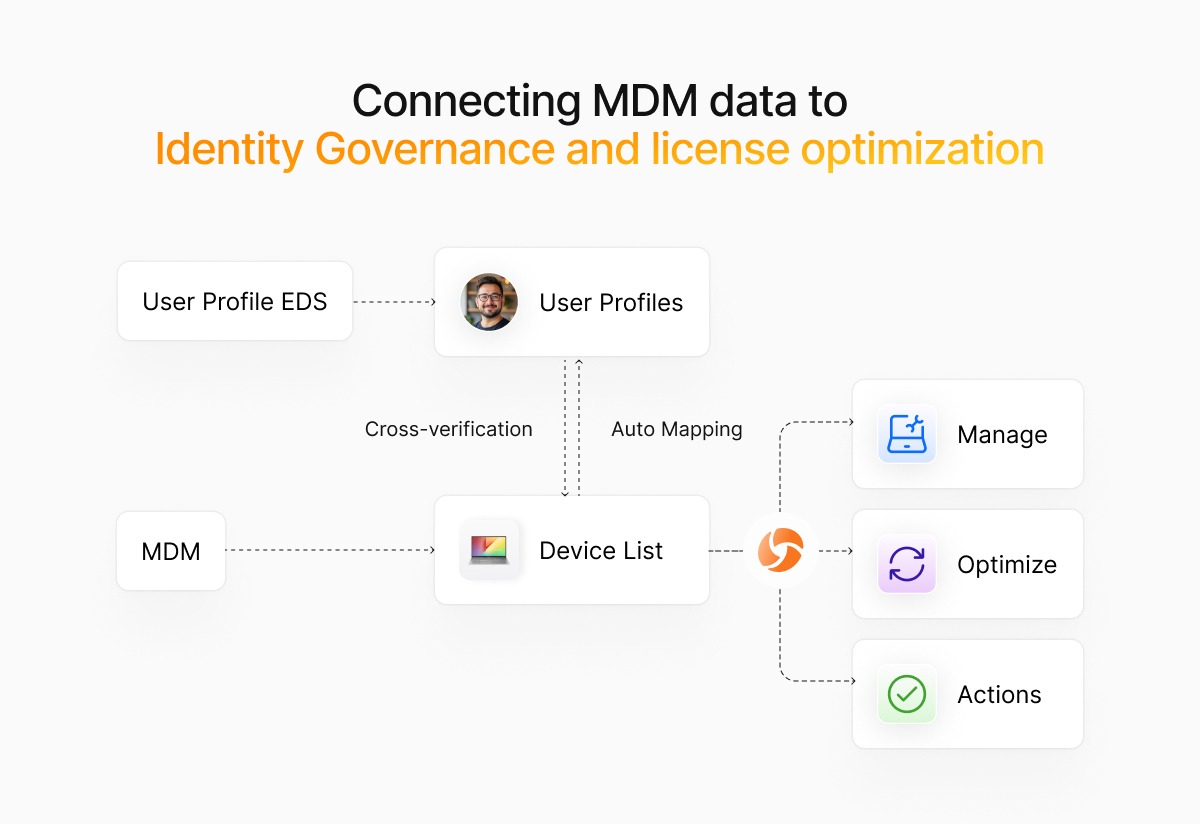
MDM platforms generate a wealth of device and usage data, but that data often lives in a silo. Forward-thinking IT teams are connecting MDM telemetry to identity governance and SaaS management platforms to unlock new levels of automation and cost savings.
For example, when a device falls out of compliance, an integrated system can automatically trigger a workflow to revoke SaaS licenses, disable SSO access, and notify the user, all without manual intervention. Similarly, MDM data can inform license optimization by identifying inactive devices or users who haven't logged in for 30+ days.
At Josys, we've seen IT teams reduce SaaS spend by 15–20% simply by correlating device activity with application usage. If an employee's laptop hasn't connected to the network in weeks, why are they still consuming a Salesforce seat? MDM data provides the signal; autonomous governance platforms provide the action.
Benefits and ROI of mobile device management solutions
The business case for MDM extends far beyond security. Here are the tangible benefits IT Directors should measure:
Reduced onboarding time: Zero-touch enrollment cuts device provisioning from hours to minutes, freeing IT to focus on strategic initiatives.
Lower security incident costs: Remote wipe and conditional access prevent data breaches before they escalate. The average cost of a data breach is $4.45 million; MDM is cheap insurance.
Improved compliance posture: Automated reporting and audit trails simplify compliance with ISO 27001, SOC 2, HIPAA, and other frameworks.
SaaS license reclamation:By linking MDM data to SaaS usage, IT can quickly identify and reclaim unused licenses, often recovering 10–25% of software spend.
Increased employee productivity: Self-service portals and automated app deployment reduce support tickets and empower employees to work from anywhere, critical when nearly 80% of remote-capable employees now work hybrid or fully remote.
Calculate your MDM ROI by estimating time saved on device management, security incidents avoided, and licenses reclaimed. Most organizations see payback within 6–12 months.
How to evaluate and compare MDM tools
Choosing the right MDM platform requires a structured evaluation process. Here's what to prioritize:
Platform support checklist
Ensure the MDM solution supports all devices in your environment, including iOS, Android, Windows, macOS, and any specialized hardware such as rugged tablets or IoT devices. Verify support for the latest OS versions and backward compatibility for legacy systems you can't immediately retire.
Security certifications to demand
Look for certifications like SOC 2 Type II, ISO 27001, FedRAMP (if you're in the public sector), and GDPR compliance. These certifications signal that the vendor takes security seriously and has undergone independent audits.
Integration and API requirements
Your MDM platform should integrate seamlessly with your identity provider (Okta, Azure AD, Google Workspace), SIEM, and SaaS management tools. Robust APIs enable custom workflows and ensure MDM data flows into your broader IT ecosystem. Ask vendors for API documentation and example integrations during the evaluation phase.
Support and scalability factors
Evaluate the vendor's support model. Do they offer 24/7 assistance? What's the average response time for critical issues? Also, confirm the platform can scale as your organization grows. If you're managing 500 devices today but expect to reach 5,000 in two years, ensure the pricing and architecture can accommodate that growth without performance degradation.
Step-by-step migration from legacy MDM systems
Migrating from a legacy MDM platform is complex, but a phased approach minimizes disruption:
1. Audit existing devices and policies
Document every device, policy, and configuration in your current MDM. Identify which policies are actively enforced, which are outdated, and which devices are out of compliance. This audit becomes your migration baseline.
2. Map new compliance requirements
Regulations and security standards evolve. Before migrating, review your compliance obligations and map them to the new MDM's capabilities. This is your opportunity to tighten security posture, don't just replicate old policies.
3. Pilot zero-touch enrollment
Start with a pilot group of 20–50 devices. Test zero-touch enrollment, policy application, and app deployment in a controlled environment. Gather feedback from pilot users and iterate before rolling out organization-wide.
4. Automate offboarding of old agents
Once devices are successfully enrolled in the new MDM, automate the removal of old MDM agents. Use scripting or the new MDM's remote command features to uninstall legacy software and reclaim system resources.
5. Measure post-migration savings
Track metrics like time spent on device management, support ticket volume, and security incidents. Compare these to your pre-migration baseline to quantify ROI and demonstrate value to leadership.
Pricing models and hidden costs of MDM software
MDM pricing typically falls into one of three models:
Per-device, per-month: The most common model. Costs range from $3–$10 per device, depending on features and vendor.
Tiered plans: Vendors offer basic, standard, and enterprise tiers with escalating features. Be wary of feature lock; critical capabilities like conditional access may be gated behind premium tiers.
Bundled suites: Some vendors bundle MDM with endpoint detection and response (EDR), identity management, or SaaS security. Bundles can offer savings, but may include tools you don't need.
Watch for hidden costs: onboarding fees, professional services for complex integrations, overage charges for exceeding device limits, and premium support contracts. Always request a total cost of ownership (TCO) estimate for a three-year period.
Elevate device and SaaS control with autonomous governance
MDM is powerful, but it's only one piece of the IT governance puzzle. The next frontier is autonomous governance, platforms that connect device management, identity lifecycle, and SaaS optimization into a single, self-healing system.
Imagine this: An employee's laptop fails a compliance check. Within seconds, the system revokes their access to sensitive SaaS applications, notifies IT, and triggers a remediation workflow, all without human intervention. When the device is compliant again, access is automatically restored. That's the promise of autonomous governance.
At Josys, we've built a platform that unifies MDM data with SaaS usage, identity governance, and license optimization. IT teams gain a single pane of glass to manage devices, apps, and users, while AI-driven automation handles the repetitive work. Book a demo here.
Frequently asked questions about mobile device management software
How do I link mobile device data to SaaS license optimization?
Most modern MDM platforms offer APIs that export device inventory and activity data. Integrate this data with your SaaS management platform to correlate device usage with application licenses. For example, if a device hasn't checked in for 30 days, flag the associated user's SaaS licenses for review. Platforms like Josys automate this correlation, surfacing unused licenses and triggering reclamation workflows.
Can AI automatically revoke privileges when a device is out of compliance?
Yes. AI-powered governance platforms can monitor device compliance status in real time and automatically revoke access to SaaS applications, email, or VPN when a device falls out of compliance. These systems use conditional access policies and identity provider integrations to enforce zero-trust principles. Once the device is remediated, access is restored automatically, no IT intervention required.