This site uses third-party website tracking technologies to provide and continually improve our services, and to display advertisements according to users' interests. I agree and may revoke or change my consent at any time with effect for the future.
Managed service providers (MSPs), efficiency isn't just a goal—it's a business imperative. Yet many MSPs continue to struggle with fragmented tools, disconnected systems, and the productivity-killing phenomenon known as "swivel-chair management." This article explores how a unified dashboard approach can transform MSP operations, streamline workflows, and deliver measurable productivity gains.
Understanding the Problem: Single Pane vs. Swivel-Chair Management
The difference between streamlined operations and chaotic workflows often comes down to how your management interfaces are designed. Let's explore the fundamental differences between these two approaches and why they matter for your MSP business.
Defining "Single Pane of Glass" Management
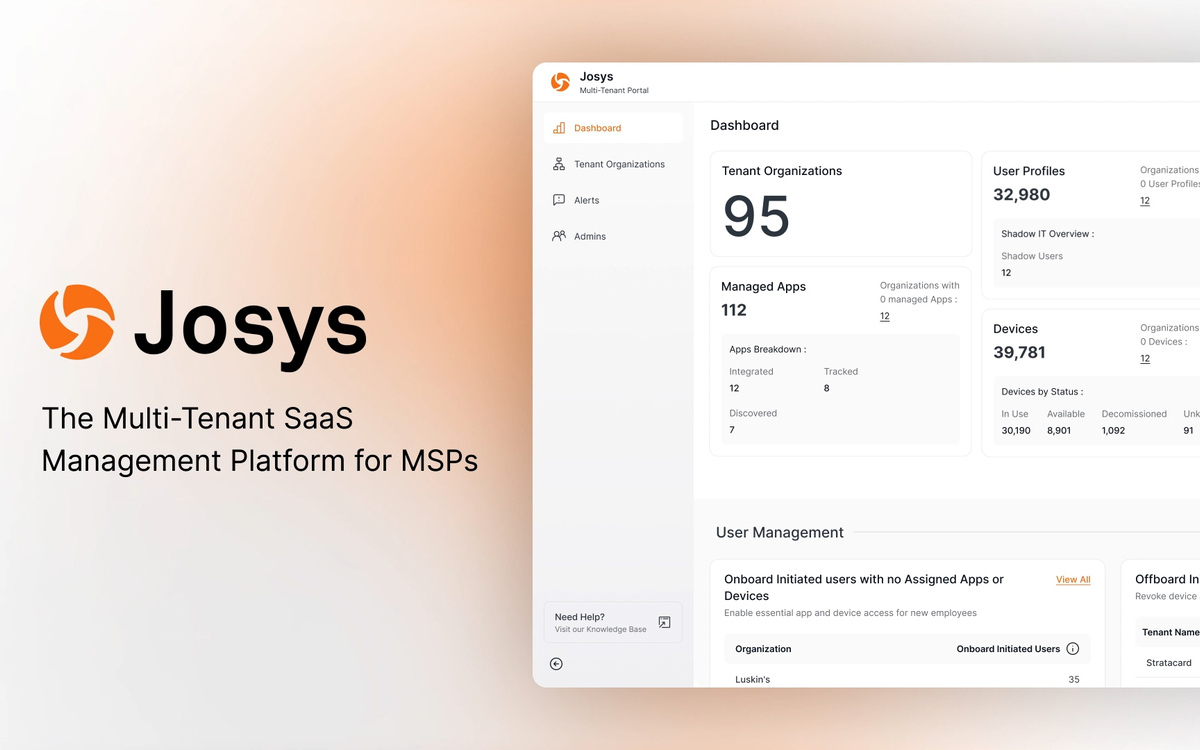
A "single pane of glass" refers to a unified dashboard or interface that consolidates multiple data sources, tools, and workflows into one cohesive view. This integrated approach allows MSP technicians and managers to access everything they need from a central location without switching between different applications or interfaces.
The key characteristics of an effective single-pane solution include:
Consolidated visibility across all client environments, systems, and services
Unified access to monitoring, management, and reporting functions
Centralized alerts and notifications from multiple sources
Integrated workflow capabilities that span different operational areas
Role-based views that deliver relevant information to specific team members
Customizable dashboard widgets that can be tailored to specific needs
When implemented correctly, a single pane of glass doesn't just combine views—it creates an operational nerve center that enhances situational awareness and speeds decision-making.
The Productivity Drain of Swivel-Chair Management
Swivel-chair management refers to the inefficient practice of constantly switching between multiple applications, screens, or systems to complete routine tasks. The term vividly describes the physical motion of turning from one screen to another as technicians juggle different tools.
This fragmented approach creates several critical problems:
Increased cognitive load as technicians must mentally context-switch between different interfaces
Higher error rates due to manual data transfer between systems
Extended time-to-resolution for tickets and service requests
Inconsistent documentation across platforms
Difficulty maintaining standardized processes
Limited visibility into comprehensive client status
Training challenges as new staff must learn multiple disconnected systems
Research from the Service Desk Institute indicates that technicians working in swivel-chair environments spend up to 45% of their time simply navigating between systems rather than solving actual problems.
The Real Cost of Fragmented Operations
The business impact of swivel-chair management extends far beyond mere inconvenience. According to a 2023 MSP benchmark study by CompTIA, MSPs with fragmented operations experience:
37% longer resolution times for standard tickets
28% higher operational costs per endpoint managed
23% lower technician utilization rates
42% higher training costs for new staff members
31% lower client satisfaction scores
For a mid-sized MSP managing 1,500 endpoints, these inefficiencies can translate to over $180,000 in lost revenue and unnecessary costs annually.
Key Takeaway: While swivel-chair management might seem like a minor operational inconvenience, it represents a significant competitive disadvantage in the MSP market, where margins are tight and service quality directly impacts client retention.
Mapping MSP Workflows to Dashboard Widgets
The true power of a single-pane approach comes from thoughtfully mapping your most common workflows to purpose-built dashboard widgets. This creates a seamless operational experience that guides technicians through standardized processes while reducing errors and improving consistency.
Client Onboarding Workflow Widgets
Client onboarding represents one of the most complex and critical processes for MSPs. A properly designed onboarding dashboard can transform this potential pain point into a competitive advantage.
Effective onboarding widgets should include:
Onboarding Progress Tracker: Visual representation of completed vs. pending tasks with percentage-based completion metrics
Documentation Collection Status: Checklist of required client documents with automated reminders for missing items
Asset Discovery Results: Real-time inventory of discovered network devices, endpoints, and software
Configuration Compliance: Comparison of client systems against your standardized configuration templates
Security Baseline Assessment: Gap analysis between current client security posture and your required standards
Timeline Visualization: Clear representation of onboarding milestones with target dates and actual completion
MSPs using structured onboarding dashboards report 64% faster time-to-value for new clients and 47% higher standardization rates across their client base.
Employee Offboarding Security Widgets
The employee offboarding process presents significant security risks if not handled properly. Purpose-built offboarding widgets help ensure consistent security practices while providing documentation for compliance purposes.
Critical offboarding security widgets include:
Access Termination Tracker: Real-time status of account deactivations across all systems and services
Device Recovery Status: Inventory of company-owned hardware with return verification
Data Backup Confirmation: Validation that all necessary user data has been properly archived
Security Revocation Checklist: Comprehensive list of all access points requiring deactivation
Exit Interview Documentation: Structured recording of security-related exit interview questions
Legal Acknowledgment Tracking: Confirmation of signed non-disclosure and intellectual property agreements
According to security research firm Ponemon Institute, organizations with structured offboarding processes experience 72% fewer security incidents related to former employee access.
License and Renewal Management Widgets
License and renewal management represents a significant revenue opportunity for MSPs, but only when managed efficiently. Dedicated dashboard widgets can transform renewal management from a reactive scramble into a proactive revenue generator.
Effective renewal management widgets should include:
Renewal Timeline: Visual calendar showing upcoming renewals with 30/60/90-day alerts
License Utilization Metrics: Usage analytics to identify under-utilized licenses that could be optimized
Margin Analysis: Per-license profitability metrics to guide renewal pricing strategies
Client Budget Forecasting: Projected renewal costs to help clients with budgeting
Version Upgrade Opportunities: Identification of clients on older versions who could benefit from upgrades
Competitive Replacement Tracking: Monitoring of competitive products that could be replaced with your preferred solutions
MSPs implementing dedicated renewal dashboards report an average 23% increase in on-time renewals and a 17% improvement in renewal upsell opportunities.
Ticket Management and Escalation Widgets
Efficient ticket management forms the backbone of MSP service delivery. Integrated dashboard widgets can dramatically improve response times, resolution rates, and client satisfaction.
Must-have ticket management widgets include:
SLA Compliance Tracker: Real-time visualization of tickets approaching SLA thresholds
Technician Workload Balancer: Dynamic view of current ticket distribution across team members
Escalation Path Visualizer: Clear representation of the escalation process with current ticket status
Knowledge Base Integration: Contextual knowledge base suggestions based on ticket content
Client Communication Timeline: Historical view of all client communications related to specific issues
Resolution Time Predictor: AI-powered estimation of resolution time based on historical data
MSPs utilizing integrated ticket management dashboards report 34% faster first-response times and 28% improvement in first-call resolution rates.
Key Takeaway: The most effective MSP dashboards don't just display information—they actively guide technicians through standardized workflows while capturing critical data at each step. This approach simultaneously improves service quality and builds valuable operational intelligence.
Measuring the Impact: Productivity Gains and Error Reduction
The business case for implementing a single-pane approach becomes compelling when you quantify the actual productivity improvements and error reductions. These metrics translate directly to improved profitability and competitive advantage.
Quantifiable Productivity Improvements
When MSPs transition from swivel-chair management to a unified dashboard approach, the productivity gains can be substantial and measurable across multiple dimensions.
Based on aggregated data from MSPs using unified dashboard systems:
Ticket Resolution Speed: Average 42% reduction in time-to-resolution for standard tickets
Documentation Efficiency: 67% less time spent on documentation tasks through automated capture
Client Onboarding: 53% reduction in total onboarding time from initial signup to fully managed
Reporting Workflows: 78% decrease in time spent generating client-ready reports
Team Collaboration: 36% reduction in internal communication overhead through centralized visibility
Training Efficiency: 44% faster time-to-productivity for new technicians
For a 10-person MSP team, these efficiency gains typically translate to recapturing 25-30 billable hours per technician per month—effectively adding the capacity of 1.5-2 full-time employees without additional hiring.
Human Error Reduction Metrics
Beyond pure productivity gains, the elimination of swivel-chair management dramatically reduces costly human errors that can impact service quality and client satisfaction.
MSPs implementing unified dashboards report:
Configuration Errors: 63% reduction in misconfiguration incidents
Missed Renewals: 82% decrease in unplanned license expirations
Security Gaps: 57% fewer security-related incidents due to overlooked steps
SLA Violations: 74% reduction in unintentional SLA breaches
Billing Accuracy: 38% improvement in billing precision and completeness
Knowledge Transfer: 49% better consistency in service delivery across different technicians
These error reductions directly impact client satisfaction and retention. According to ServiceNow's State of Service Management survey, 89% of clients cite consistency and accuracy as primary factors in MSP relationship longevity.
ROI Timeline for Dashboard Implementation
Implementing a unified dashboard approach requires investment, but the return on investment timeline is typically much shorter than many operational improvements.
Based on implementation data from over 200 MSPs:
Initial Productivity Gains: Visible within 2-4 weeks of implementation
Break-even Point: Typically reached within 4-6 months
Full ROI Realization: 250-400% ROI common within 12-18 months
Ongoing Optimization: Additional 15-20% efficiency gains in years 2-3 through refinement
The most significant ROI accelerator comes from starting with high-frequency, high-impact workflows rather than attempting to integrate everything at once.
Not all dashboard solutions deliver equal value. When evaluating potential platforms, asking the right questions can help you identify solutions that will truly transform your operations rather than simply adding another screen to monitor.
Role-Based View Capabilities
Role-based views ensure that team members see exactly what they need without information overload or access to sensitive data they don't require.
Critical questions to ask vendors about role-based views:
How granular are your permission controls for dashboard elements?
Can dashboard configurations be assigned to roles rather than individual users?
Do role definitions support hierarchical structures (e.g., junior tech vs. senior tech vs. team lead)?
How are dashboard changes propagated across users with the same role?
Can users customize their views within the boundaries of their role permissions?
What audit capabilities exist to track who accessed what information and when?
Look for solutions that offer role templates aligned with common MSP team structures while allowing customization to match your specific organizational needs.
White-Labeling and Client Portal Options
For MSPs, the ability to extend dashboard functionality to clients while maintaining brand consistency is increasingly important for client engagement and perceived value.
What elements of the interface can be customized with our branding?
Can we create different branded experiences for different client segments?
How does the solution handle multi-tenant scenarios with distinct branding requirements?
What client-facing dashboard templates are available out of the box?
Can we control which metrics and data elements are visible to clients?
What is the process for updating branding elements across all instances?
Does the solution support custom domains for client portal access?
The most effective solutions offer comprehensive white-labeling that extends beyond simple logo replacement to include terminology customization, color schemes, and even workflow language that matches your service offerings.
Integration Depth and API Flexibility
The value of a unified dashboard depends heavily on how deeply it integrates with your existing tools and how adaptable it is to future changes in your technology stack.
Critical integration questions include:
Which PSA, RMM, and documentation platforms do you offer native integrations with?
How are API rate limits handled to prevent performance issues during high-volume operations?
What capabilities exist for custom integration development?
How does the platform handle authentication across different integrated systems?
What is the process for maintaining integrations when integrated products update their APIs?
Can we create custom data mappings between fields in different systems?
What options exist for real-time vs. scheduled data synchronization?
Look for solutions that offer both breadth (many integrations) and depth (rich functionality within each integration) rather than simple surface-level connections.
Dashboard Performance and Scalability
As your MSP grows, your dashboard solution needs to scale accordingly without performance degradation or reliability issues.
Important performance and scalability questions:
What are the recommended hardware/bandwidth requirements as user count increases?
How does the solution handle concurrent users accessing the same dashboard elements?
What performance benchmarks exist for environments similar to our size?
How is dashboard performance impacted when adding additional data sources?
What caching mechanisms are in place to optimize frequently accessed data?
What monitoring tools are available to identify performance bottlenecks?
How does the architecture scale to accommodate business growth?
Request specific performance metrics for MSPs of your current size and 2-3x your current size to ensure the solution can grow with your business.
Key Takeaway: The right dashboard solution should adapt to your business model rather than forcing you to adapt to its limitations. Prioritize vendors who demonstrate deep understanding of MSP-specific workflows and who can articulate how their solution addresses the particular challenges of managed service delivery.
Conclusion: From Fragmentation to Unified Operations
The transition from swivel-chair management to a single pane of glass approach represents one of the highest-impact operational improvements available to modern MSPs. By consolidating disparate tools and workflows into a unified interface, MSPs can dramatically improve productivity, reduce errors, and deliver more consistent client experiences.
The data is clear: MSPs who implement unified dashboard approaches outperform their peers across virtually every operational metric—from technician efficiency to client satisfaction. The resulting competitive advantages translate directly to improved profitability and accelerated growth.
As you evaluate potential dashboard solutions, look beyond surface-level features to assess how deeply the platform can integrate with your existing tools and how effectively it maps to your specific workflows. The most valuable solutions don't just display data—they actively guide your team through standardized processes while capturing the insights you need to continuously improve your service delivery.
Ready to eliminate swivel-chair management from your MSP operations?
How long does a typical dashboard implementation take?
Most MSPs can implement core dashboard functionality within 2-4 weeks, with phased rollouts of additional features over 2-3 months. The key success factor is prioritizing high-frequency workflows first rather than attempting to integrate everything simultaneously.
What integration challenges should we anticipate?
The most common integration challenges involve data synchronization between systems with different field structures, authentication management across multiple platforms, and handling of API rate limits during initial data population. Working with a vendor experienced in MSP environments can significantly reduce these challenges.
How do we measure ROI for dashboard implementation?
The most effective ROI metrics include: time saved per ticket resolution, reduction in missed renewals, decreased onboarding time for new clients, improved technician utilization rates, and reduced training time for new staff. Baseline these metrics before implementation for accurate comparison.
Can we start with a limited implementation and expand later?
Yes, a phased approach is often the most successful strategy. Begin with your highest-volume workflows (typically ticket management and client onboarding) to demonstrate quick wins, then expand to additional operational areas as your team becomes comfortable with the new approach.
How do we ensure technician adoption of the new dashboard?
Successful adoption strategies include: involving technicians in the dashboard design process, providing structured training with real-world scenarios, highlighting time-saving benefits specific to daily tasks, and implementing gamification elements that recognize dashboard utilization.