This site uses third-party website tracking technologies to provide and continually improve our services, and to display advertisements according to users' interests. I agree and may revoke or change my consent at any time with effect for the future.
Zero Trust has emerged as the security model of choice for forward-thinking organizations. But while the concept sounds straightforward—"never trust, always verify"—implementing Zero Trust for cloud applications requires strategic planning, technical know-how, and organizational buy-in.
This guide walks IT Directors through the practical steps of implementing Zero Trust security for cloud applications, from foundational principles to advanced implementation strategies tailored to your organization's security maturity.
Understanding Zero Trust Fundamentals for Cloud Applications
Zero Trust isn't just another security framework—it's a paradigm shift in how we approach access management in a cloud-first world. Unlike traditional security models that implicitly trust users inside the network perimeter, Zero Trust assumes breach and verifies each request as though it originates from an open network.
For cloud applications specifically, this approach is not optional but essential. With resources scattered across multiple cloud providers, SaaS platforms, and hybrid environments, the traditional network boundary has dissolved, making perimeter-based security increasingly ineffective.
At its foundation, Zero Trust security for cloud applications rests on three critical pillars:
1. Verify explicitly: Authentication and authorization decisions must be based on all available data points—identity, location, device health, service or workload, data classification, and anomalies.
2. Use least privileged access: Limit user access with just-in-time and just-enough-access (JIT/JEA), risk-based adaptive policies, and data protection to secure both data and productivity.
3. Assume breach: Minimize blast radius and segment access. Verify end-to-end encryption, use analytics to detect threats, and drive improvements.
These principles manifest differently in cloud environments compared to on-premises infrastructure. Cloud applications present unique challenges: they're accessible from anywhere, often managed outside IT's direct control, and frequently contain sensitive data that flows across organizational boundaries.
The Evolution from Traditional Security Models
Traditional security operated on a castle-and-moat principle: heavily fortified perimeters with relatively free movement inside. This approach fails spectacularly in cloud environments where:
Applications reside outside your network perimeter
Users access resources from unmanaged devices and networks
The shift to Zero Trust represents an evolution from:
Network-centric to identity-centric security
Static, perimeter-based to dynamic, risk-based controls
Implicit trust zones to continuous verification
Coarse-grained access to fine-grained authorization
For cloud applications specifically, this means implementing controls that travel with the data and users rather than trying to force cloud services into outdated network security models.
Implementing Conditional Access for Cloud Applications
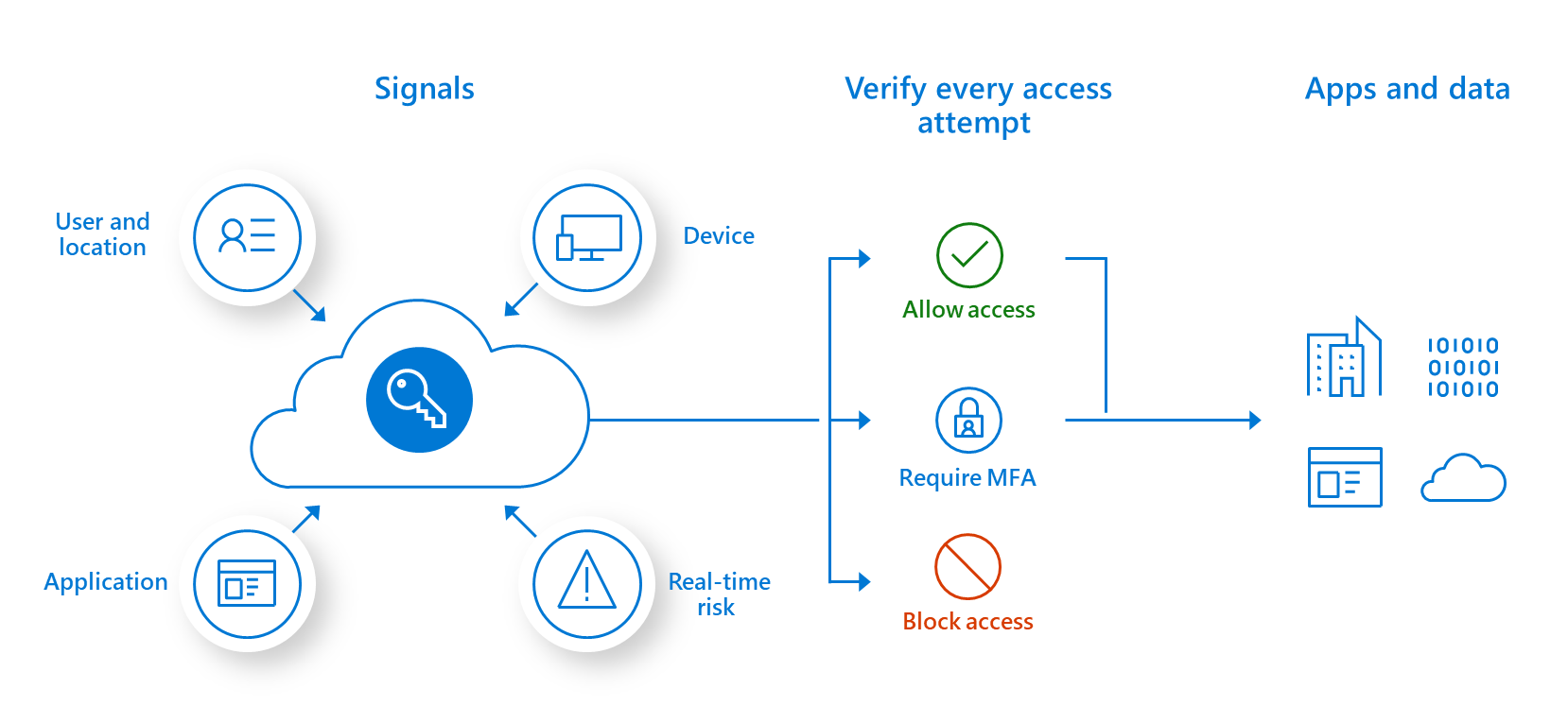
Conditional Access serves as the policy enforcement engine of your Zero Trust strategy. It acts as a sophisticated gatekeeper, making real-time decisions about who can access what resources based on a rich set of signals and policies.
For cloud applications, Conditional Access becomes your primary control point—replacing the network perimeter with a dynamic, policy-based approach that evaluates each access request against multiple risk factors.
Designing Effective Conditional Access Policies
Effective Conditional Access policies strike a balance between security and usability. They're granular enough to provide meaningful protection but not so complex that they become unmanageable.
When designing policies for cloud applications, consider these key components:
1. Assignment conditions: Define who the policy applies to
3. Policy evaluation: Understand how multiple policies interact
Policies are evaluated in parallel, not sequentially
If any policy blocks access, the user is blocked
All grant conditions from all applicable policies must be satisfied
Signal-Based Risk Assessment
The power of Conditional Access lies in its ability to incorporate multiple signals into access decisions. For cloud applications, these signals provide crucial context:
User identity signals: Group membership, role, authentication method
Device signals: Management state, compliance status, operating system
Location signals: IP address, country/region, corporate network vs. public
Application signals: Data sensitivity, application risk profile
By combining these signals, you can create sophisticated policies that adapt to different risk scenarios. For example:
Allow seamless access to low-sensitivity applications from managed devices on corporate networks
Require MFA for the same applications when accessed from unmanaged devices
Require both MFA and compliant devices for high-sensitivity applications regardless of network
Block access entirely for high-risk sign-in attempts
Multi-Factor Authentication Strategies for Cloud Security
Multi-factor authentication (MFA) stands as the single most effective control in preventing account compromise. Microsoft's security research shows that MFA blocks 99.9% of automated attacks and significantly reduces the success rate of targeted attacks.
For cloud applications, implementing MFA isn't just a best practice—it's a fundamental security requirement. However, not all MFA implementations are created equal, and the way you deploy MFA can significantly impact both security and user experience.
Beyond Basic MFA: Advanced Authentication Options
Basic MFA—typically a password plus a second factor—provides significant security improvements, but advanced MFA strategies offer both stronger protection and better user experience:
Passwordless authentication: Eliminating passwords removes a major attack vector and reduces user friction.
FIDO2 security keys provide phishing-resistant authentication
Biometric authentication (Windows Hello, Touch ID) offers convenience with security
Mobile app authenticators with push notifications simplify the authentication process
Risk-based authentication: Adjusting authentication requirements based on risk signals.
Low-risk scenarios might require only a single factor
Medium-risk scenarios trigger standard MFA
High-risk scenarios might require stronger factors or admin approval
Continuous authentication: Moving beyond point-in-time verification to ongoing session monitoring.
Behavioral biometrics track typing patterns, mouse movements, and other signals
Session risk evaluation checks for anomalies during active sessions
Automatic step-up authentication when risk levels change
Balancing Security and User Experience
The most secure authentication method is worthless if users find ways around it. Successful MFA deployment requires careful balancing of security requirements with user experience considerations:
1. Tailor MFA methods to user groups:
Executive users might prefer biometrics or mobile push notifications
Technical users often adapt well to security keys
Field workers may need offline authentication options
2. Implement smart MFA policies:
Use trusted locations to reduce MFA prompts when on corporate networks
Implement longer session persistence for low-risk applications
Create risk-based policies that trigger MFA only when necessary
3. Provide user choice within security parameters:
Offer multiple approved authentication methods
Allow users to choose their preferred method from the approved list
Provide self-service options for device registration and management
4. Focus on education and clear messaging:
Explain why MFA is necessary (protecting both the organization and the individual)
Provide clear instructions for each authentication method
Create quick reference guides for troubleshooting common issues
Research from the FIDO Alliance shows that organizations that implement user-friendly MFA see adoption rates 3x higher than those that mandate specific methods without consideration for user preferences.
Key Takeaway: The most effective MFA strategy combines strong technical controls with thoughtful user experience design, resulting in both higher security and better adoption rates.
Implementing Least Privilege Access for Cloud Applications
The principle of least privilege—granting only the minimum permissions necessary to perform a function—becomes both more critical and more complex in cloud environments. With the expansive capabilities of modern cloud applications, over-privileged accounts represent significant security risks.
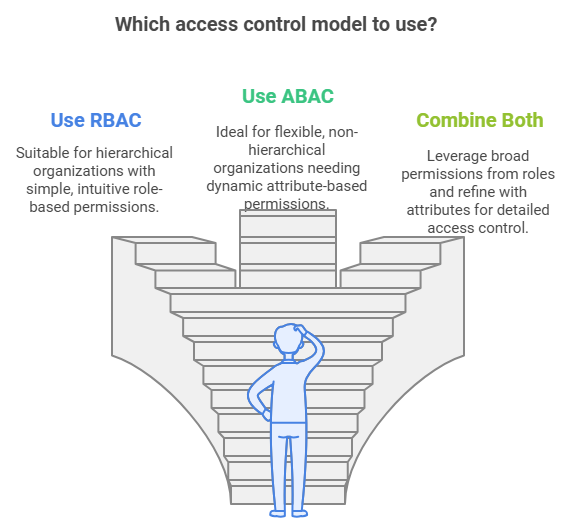
Implementing least privilege for cloud applications requires moving beyond traditional role-based access control to more granular, dynamic permission models that adapt to changing user needs and risk profiles.
Role-Based Access Control vs. Attribute-Based Access Control
Traditional Role-Based Access Control (RBAC) assigns permissions based on predefined roles. While straightforward to implement, RBAC often leads to permission creep and lacks the flexibility needed for dynamic cloud environments.
Attribute-Based Access Control (ABAC) offers a more sophisticated approach by making access decisions based on a combination of attributes:
User attributes: Department, job level, location, security clearance
RBAC approach: "Marketing Managers have edit access to all marketing documents"
ABAC approach: "Marketing Managers have edit access to marketing documents for their region, during business hours, from compliant devices, unless the documents are classified as confidential"
Static access permissions—even when following least privilege—still create unnecessary risk windows. Just-in-Time (JIT) and Just-Enough Access (JEA) models address this by making access both temporary and limited:
Just-in-Time Access:
Provides temporary, time-bound access to resources
Requires justification for elevated access
Automatically revokes access when no longer needed
Creates audit trail of privilege usage
Just-Enough Access:
Limits elevated permissions to specific tasks
Provides only the commands or actions needed
Creates predefined privileged sessions with boundaries
Prevents privilege escalation within sessions
Implementing these models for cloud applications typically involves:
Convert permanent permissions to eligible assignments
Implement access reviews and certification
3. Task-based access workflows:
Define common administrative tasks
Create predefined access packages for specific functions
Implement request-grant-revoke workflows
Key Takeaway: Effective least privilege implementation combines fine-grained permission models (ABAC) with temporal constraints (JIT/JEA) to minimize the risk window and scope of potential compromise.
Phased Implementation Approach Based on Security Maturity
Implementing Zero Trust for cloud applications isn't a one-size-fits-all proposition. Organizations at different security maturity levels face different challenges and should prioritize different aspects of the framework.
A phased approach allows you to build momentum with early wins while systematically strengthening your security posture over time. The key is to align your implementation roadmap with your organization's current capabilities and most pressing risks.
Organizations at the beginning of their Zero Trust journey should focus on establishing fundamental security controls that provide immediate risk reduction with relatively straightforward implementation.
Priority actions for Phase 1:
1. Implement basic MFA for all users
Deploy MFA for all cloud applications, starting with critical systems
Focus on user-friendly methods like mobile authenticator apps
Create exceptions process for special cases, but minimize exceptions
2. Establish baseline Conditional Access policies
Block legacy authentication protocols
Require MFA for all admin accounts
Implement location-based restrictions for high-risk countries
Block unknown or unsupported device platforms
3. Conduct access inventory and cleanup
Identify and document all cloud applications in use
Review current access permissions and remove obvious over-permissioning
Implement basic access reviews for critical applications
Document baseline access patterns for future policy refinement
4. Establish security monitoring fundamentals
Enable audit logging for all cloud applications
Implement basic alert rules for high-risk activities
Create incident response procedures for common scenarios
Establish regular review of security logs and alerts
A retail organization at this maturity level implemented these foundational controls and prevented 3,400 potentially compromised account sign-ins in the first month while establishing visibility into cloud application usage that revealed 37 previously unknown shadow IT applications.
Success metrics for Phase 1:
MFA enrollment rate (target: >95% of users)
Reduction in password-based authentication attempts
Number of access reviews completed
Reduction in dormant accounts and excessive permissions
Organizations with foundational controls in place can move to more sophisticated protections that provide greater security with more granular policies.
Priority actions for Phase 2:
1. Implement advanced authentication
Deploy passwordless authentication options
Implement risk-based authentication policies
Reduce authentication friction for low-risk scenarios
Strengthen authentication requirements for privileged access
2. Enhance Conditional Access with device controls
Implement device compliance requirements
Deploy endpoint management for corporate devices
Create differentiated policies for managed vs. unmanaged devices
Implement application protection policies for mobile devices
3. Refine access controls with ABAC principles
Implement attribute-based access for critical applications
Develop more granular role definitions
Begin implementing time-bound access for privileged functions
Create data classification scheme and align access controls
4. Strengthen security monitoring and response
Implement user and entity behavior analytics (UEBA)
Create automated response workflows for common incidents
Develop comprehensive dashboard for security posture
Establish regular threat hunting processes
A healthcare organization at this maturity level implemented these enhanced controls and reduced their mean time to detect (MTTD) security incidents by 76% while reducing inappropriate access to sensitive patient data by 92%.
Success metrics for Phase 2:
Percentage of users using passwordless authentication
Reduction in security incidents related to compromised accounts
Percentage of privileged access that is time-bound
Mean time to respond to security incidents
Phase 3: Advanced Zero Trust (Advanced Maturity)
Organizations with robust security foundations can implement advanced Zero Trust capabilities that provide comprehensive protection with sophisticated automation and integration.
Priority actions for Phase 3:
1. Implement continuous adaptive access
Deploy continuous authentication monitoring
Implement session reassessment based on risk signals
Create dynamic access policies that adapt to threat landscape
Integrate threat intelligence into access decisions
2. Deploy comprehensive JIT/JEA model
Eliminate standing privileged access
Implement workflow automation for access requests
Create task-based access packages with precise permissions
Implement full audit and review of privileged sessions
3. Extend Zero Trust to data level
Implement data loss prevention integrated with access controls
Deploy information protection for sensitive content
Create data-aware access policies
Implement real-time data access monitoring
4. Establish advanced security operations
Implement security orchestration and automated response (SOAR)
Create comprehensive security scoring and benchmarking
Develop predictive risk models for proactive protection
Establish continuous security testing program
Success metrics for Phase 3:
Percentage reduction in standing privileged access
Time to revoke access for terminated employees
Data protection coverage across cloud applications
Automation rate for security incident response
Key Takeaway: Align your Zero Trust implementation with your organization's security maturity to achieve meaningful progress while building toward a comprehensive security model. Each phase should deliver concrete security improvements while establishing the foundation for more advanced capabilities.
Measuring Success and Continuous Improvement
Implementing Zero Trust for cloud applications isn't a one-time project but an ongoing program that requires continuous measurement, refinement, and adaptation. Establishing clear metrics and improvement processes ensures your security controls remain effective as threats evolve and your cloud footprint changes.
Key Performance Indicators for Zero Trust Implementation
Effective measurement of your Zero Trust implementation requires a balanced set of metrics that cover both security outcomes and operational impacts:
Security effectiveness metrics:
Account compromise rate: Frequency of unauthorized account access
Mean time to detect (MTTD): Average time to identify security incidents
Mean time to respond (MTTR): Average time to contain and remediate incidents
Data exfiltration incidents: Unauthorized data access or transfer events
Attack surface reduction: Decrease in exposed attack vectors
Operational metrics:
Authentication success rate: Percentage of successful vs. failed authentications
MFA adoption rate: Percentage of users enrolled in and using MFA
Help desk call volume: Access-related support requests
Access request processing time: Time to fulfill legitimate access needs
User satisfaction scores: Feedback on authentication experience
Compliance and governance metrics:
Policy exception rate: Frequency and justification of security exceptions
Access review completion rate: Percentage of access certifications completed
Privileged access percentage: Proportion of users with elevated rights
Unauthorized application usage: Shadow IT discovery and remediation
Compliance violation rate: Frequency of policy non-compliance
Building a Continuous Improvement Process
Zero Trust implementation should incorporate feedback loops that drive ongoing refinement of your security controls:
1. Establish regular review cadence
Weekly operational reviews of key metrics
Monthly security posture assessments
Quarterly strategic reviews of the Zero Trust roadmap
Annual comprehensive program evaluation
2. Implement feedback mechanisms
User experience surveys and feedback channels
Security incident post-mortems with lessons learned
Business impact assessments
Technical performance reviews
3. Create a structured improvement process
Document baseline metrics before changes
Implement changes with clear hypotheses
Measure outcomes against predictions
Document learnings and adjust approach
4. Maintain threat intelligence integration
Update policies based on emerging threats
Conduct regular threat modeling exercises
Perform security testing against current attack techniques
Benchmark against industry peers and standards
Key Takeaway: Effective Zero Trust implementation requires both clear metrics to measure progress and structured processes to drive continuous improvement based on real-world feedback and changing threat landscapes.
Conclusion: Embracing Zero Trust as a Journey
Implementing Zero Trust for cloud applications represents a fundamental shift in security architecture—moving from static, perimeter-based controls to dynamic, identity-centered protection that follows users and data wherever they go. This approach isn't just more secure; it's better aligned with how modern organizations actually work in a cloud-first world.
Throughout this guide, we've explored the core components of Zero Trust implementation: conditional access policies that make contextual decisions, advanced MFA strategies that balance security and usability, least privilege models that minimize risk surface, and phased implementation approaches tailored to your security maturity.
The most successful organizations approach Zero Trust not as a destination but as an ongoing journey of continuous improvement. They recognize that perfect security doesn't exist, but resilient security—the ability to prevent, detect, and respond to threats while enabling business operations—is achievable through systematic implementation of Zero Trust principles.
As you move forward with your Zero Trust implementation, remember that the goal isn't checking boxes on a framework but creating meaningful security improvements that protect your organization's most valuable assets while enabling your users to work effectively in an increasingly cloud-centric world.
Frequently Asked Questions
How long does it typically take to implement Zero Trust for cloud applications?
Implementation timelines vary significantly based on organizational size, complexity, and starting maturity. Generally:
Phase 1 (Foundational): 3-6 months
Phase 2 (Enhanced): 6-12 months
Phase 3 (Advanced): 12-24 months
Organizations should focus on incremental improvements rather than waiting for a "big bang" implementation. Even partial implementation provides significant security benefits compared to traditional models.
How do we handle legacy applications that don't support modern authentication?
Legacy applications present a common challenge in Zero Trust implementations. Options include:
Application proxies that add authentication layers in front of legacy systems
Privileged access workstations for accessing legacy applications
Network microsegmentation to isolate legacy applications
Application modernization or replacement for critical systems
The key is to avoid making exceptions that create security gaps while finding pragmatic solutions for business-critical legacy systems.
What are the most common pitfalls in Zero Trust implementation?
Common implementation challenges include:
Focusing on technology without addressing process and people aspects
Creating overly restrictive policies that generate excessive user friction
Failing to secure executive sponsorship and cross-functional alignment
Implementing controls without adequate monitoring and measurement
Treating Zero Trust as a project rather than an ongoing program
Organizations that approach Zero Trust as a holistic security transformation rather than a technical implementation are more likely to achieve sustainable success.
How do we balance security and productivity in our Zero Trust implementation?
Balancing security and productivity requires:
Risk-based approach that applies stronger controls to higher-risk scenarios
User involvement in design and testing of security controls
Phased implementation with feedback loops and adjustments
Clear communication about security changes and their business benefits
Measurement of both security outcomes and operational impacts
The most effective Zero Trust implementations improve both security and user experience by replacing outdated, high-friction controls with more contextual, risk-based approaches.
How does Zero Trust impact our cloud application procurement process?
Zero Trust principles should inform cloud application selection through:
Security requirements in RFPs and vendor assessments
Evaluation of authentication and authorization capabilities
API and integration capabilities for security monitoring
Compliance with data protection requirements
Support for modern identity standards (SAML, OIDC, SCIM)
Organizations should develop a security baseline for cloud applications and incorporate Zero Trust requirements into procurement processes to avoid creating security gaps with new applications.
Ready to Strengthen Your Cloud Security Posture?
Josys helps IT Directors implement robust Zero Trust security for cloud applications through our comprehensive AI-native identity security and governance platform. Our solution provides visibility across your cloud application portfolio, streamlines access management, and enables security policy enforcement at scale.
Take the next step in your Zero Trust journey by booking a demo with our security specialists. We'll show you how Josys can help you implement the security controls discussed in this guide while reducing administrative overhead and improving user experience.