

What Is Privileged Access Management?
Join hundreds of companies and start your identity governance journey today
Privileged Access Management (PAM) is a cybersecurity strategy and set of technologies designed to control, monitor, and secure access to an organization's most critical systems and sensitive data. It focuses specifically on managing and protecting "privileged accounts" - those with elevated permissions that can make significant system changes, access confidential information, or control critical infrastructure.
TL;DR
- What PAM is: the controls that govern accounts with elevated permissions — administrators, service accounts, root and break-glass credentials.
- Core capabilities: credential vaulting and rotation, session monitoring and recording, just-in-time elevation, and least-privilege enforcement.
- How it differs from IAM: IAM governs who gets in. PAM governs what the most dangerous accounts can do once they are in.
- Where most programmes fail: not the vault — the accounts nobody inventoried. Standing admin rights and unowned service accounts are the recurring gap.
As Darren Guccione, CEO and Co-founder of Keeper Security, states, "[organizations'] risk of data breaches and cyberattacks increases exponentially if they have not deployed a PAM solution." Guccione further emphasizes that a majority of "successful breaches involve stolen or compromised credentials," meaning that organizations of all sizes need a PAM solution that proactively stays one step ahead.
A robust PAM solution provides several critical capabilities:
- Access control: limiting privileged access to only those who absolutely need it
- Session monitoring: monitoring and analyzing privileged sessions
- Just-in-time access: granting temporary privileges only when needed
- Least privilege enforcement: ensuring users have only the minimum permissions necessary
PAM vs IAM vs IGA vs PIM: what each one actually covers
These four acronyms overlap enough that vendors use them loosely, and getting them straight matters during evaluation because it determines what you are actually buying.
- IAM (identity and access management) governs authentication and provisioning for the whole workforce — who exists, how they prove it, what they get on day one. Breadth across all users.
- PAM (privileged access management) governs the subset of accounts that can cause serious damage: administrators, root, service accounts, break-glass credentials. Depth on the dangerous few.
- IGA (identity governance and administration) governs the process around access — approvals, access reviews, certification, segregation of duties, audit evidence. Governance rather than enforcement.
- PIM (privileged identity management) is largely a Microsoft-ecosystem term for the elevation and time-bound-role portion of PAM. Treat it as a component, not a separate category.
In practice they layer. IAM decides you are an engineer. IGA decides whether you should hold production admin and records who approved it. PAM makes that admin access temporary, vaulted and recorded. IAM vs IGA covers the governance side of that distinction in more depth.
Why PAM Solutions Are Important?
PAM solutions prevent unauthorized access to privileged accounts while enabling legitimate users to perform their duties securely. These privileged accounts are prime targets for cyberattacks because they provide access to:
- Administrative systems and databases
- Financial records and intellectual property
- Network infrastructure and security controls
- Cloud environments and production servers
But why does it matter?
- Prevent Data Breaches: 80%+ of security breaches involve compromised privileged credentials
- Meet Compliance Requirements: Regulations like SOC 2, HIPAA, and PCI-DSS mandate privileged access controls.
- Reduce Insider Threats: Monitoring prevents both malicious and accidental misuse
- Support Zero Trust Security: Verifies every access attempt regardless of user status
For example, DevOps teams use Privileged Access Management (PAM) to secure elevated permissions in AWS. All credentials are stored in HashiCorp Vault and accessed through SSO and MFA.
When engineers need admin access, they request it (JIT) just-in-time and receive temporary credentials that expire after 60 minutes. PAM proxies record all privileged sessions for auditing in Splunk, while Jenkins pipelines retrieve short-lived IAM tokens from Vault at runtime, eliminating the need for static credentials.
This approach enforces least privilege, removes standing admin rights, ensures full auditability, limits credential exposure, and supports compliance with SOC 2, ISO 27001, and PCI-DSS standards.
Key Components of Privileged Access Management
PAM involves several key components that work together to secure privileged accounts throughout their lifecycle.
Credential Vaulting & Rotation
- Stores privileged credentials in encrypted vaults
- Eliminates shared passwords and hard-coded credentials
- Rotates automatically, so a leaked credential has a short useful life
Access Control & Session Management
- Just-in-time (JIT) access that grants permissions only when needed
- Session recording and monitoring for audit trails
- Multi-factor authentication (MFA) for privileged accounts
Privileged access and user monitoring covers what to monitor, which signals matter, and how to avoid drowning in session logs nobody reviews.
Privilege Elevation & Delegation
- Allows temporary elevation of user privileges for specific tasks
- Enforces least-privilege principles by limiting permissions to the minimum necessary
- Automated workflows for approval and access requests
Governance and review
Vaulting and elevation are enforcement. Governance is the layer that decides who should hold privilege in the first place, records the approval, and re-checks it periodically. Without it, PAM becomes a well-secured vault protecting entitlements nobody ever validated. Privileged access governance covers approval models, review cadence and audit evidence.
Types of privileged accounts to inventory
Most PAM programmes stall at discovery rather than deployment. These are the categories that get missed:
- Named administrator accounts - domain, cloud, SaaS tenant and database admins. Usually known.
- Shared and local admin accounts - the legacy account three people use. Rarely documented.
- Service accounts and machine identities - often the largest population, frequently with broad permissions, no owner and credentials that never expire. Managing identities for human and non-human users
- Break-glass and emergency access - necessary, but needs alerting on use rather than blocking.
- Third-party and vendor access - contractors and support vendors with standing access past the engagement.
- SaaS super-admins - the tenant owner in every SaaS app you run. Often outside PAM scope entirely, which is exactly why it matters.
That last category is where SaaS-first organizations are most exposed. Traditional PAM was built for infrastructure — servers, databases, network gear. It rarely sees who holds super-admin in your fifty SaaS applications.
How to implement PAM without breaking production
The fastest way to lose organizational support for a PAM programme is to revoke access that something depended on. A phased sequence avoids that.
- Discover before you control. Inventory every privileged account across infrastructure, cloud and SaaS. Include service accounts. You cannot vault what you have not found.
- Assign an owner to each. Not a team name - an accountable person. Unowned privileged accounts are the highest-risk findings and the hardest to remediate later.
- Vault and rotate credentials, starting with shared and hard-coded ones. This is high-value and low-disruption.
- Add MFA and session recording on privileged paths before removing anything.
- Trace dependencies, then remove standing privilege. Convert to JIT elevation. Do this last and do it per-system - this is the step that breaks pipelines if rushed.
- Institute periodic review so privilege does not silently re-accumulate.
Two guardrails worth stating plainly. Never disable a service account without tracing what calls it. And record why privilege was retained when it is retained - those exceptions are your audit trail and your next review's starting point.
What PAM costs, and how vendors price it
PAM pricing is less standardised than most security categories, which makes comparison difficult. The models you will encounter:
- Per privileged user, per month - the most common. Cost scales with how many people hold elevated access.
- Per managed target - priced by servers, databases or endpoints under management. Can escalate quickly in cloud environments where targets are ephemeral.
- Per vaulted credential or secret - common in DevOps-oriented tooling.
- Platform bundles - PAM packaged with IGA, identity security or endpoint privilege. Often better value if you need the adjacent capabilities, wasteful if you do not.
Watch for the costs that sit outside the licence: implementation and professional services (frequently a multiple of year-one licence on enterprise deployments), connector or integration fees for non-standard targets, session-recording storage, and premium support. Ask for a three-year total cost of ownership rather than comparing list prices.
How to evaluate PAM tools
- Coverage of what you actually run. Strong on Windows and Linux servers is table stakes. Test cloud consoles, Kubernetes, databases and - critically - SaaS admin accounts.
- Discovery beyond the agent. Focus on the range of privilege access the tool can cover. Mostly it is supported by the braod coverage of apps that the tool can support.
- JIT that works without friction. If elevation takes fifteen minutes, engineers will route around it and you will end up with shadow standing access.
- Identity provider integration. Bidirectional sync with Okta, Entra ID or Google Workspace is what makes access decisions current rather than nightly.
- Audit output an auditor accepts. Can you produce evidence that a given control held over a given period, without assembling it by hand?
- Break-glass that survives an outage. If your PAM tool is down, can you still reach production? Test this before you need it.
How the Josys Platform Tackles Privileged Access Management
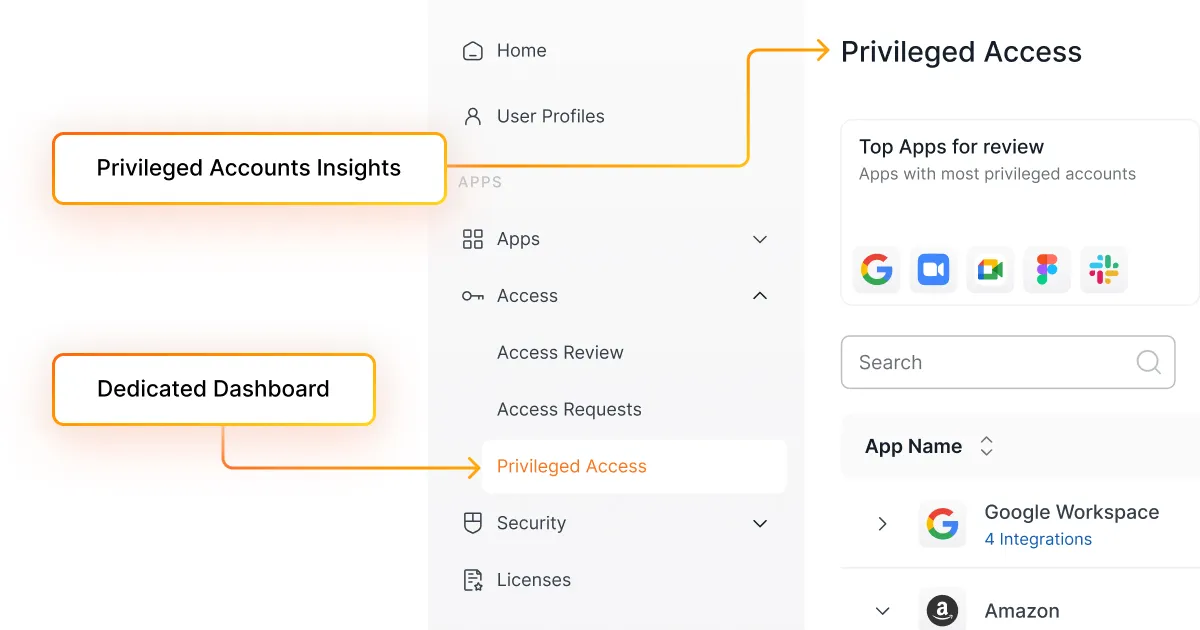
At Josys, we've built our platform with privileged access management at its core. Our approach focuses on making sophisticated security accessible and manageable for organizations of all sizes.
"Privileged access management isn't just about security—it's about enabling business growth while protecting your most valuable assets," says Tim Silva, Product Design Lead at Josys. "We've designed our PAM capabilities to be both powerful and intuitive, ensuring that organizations can implement robust security without adding complexity. In today's threat landscape, this balance of security and usability isn't just nice to have; it's essential for survival."
The Josys platform provides:
- Comprehensive visibility: A unified dashboard showing all privileged accounts, their owners, and their access levels
- Automated lifecycle management: Streamlined provisioning and deprovisioning of access rights as employees join, move within, or leave the organization
- Just-in-time access: Temporary elevation of privileges with automatic expiration
- Detailed audit trails: Complete records of who accessed what and when
- Seamless integration: Connection with your existing identity management and security tools
You can see how privileged access fits the wider governance picture on the identity security and risk page, or book a demo.
Beyond Security to Business Enablement
Privileged access management is no longer just a security best practice; it's a necessity. As organizations increasingly rely on digital systems and face growing regulatory requirements, the ability to control, monitor, and audit privileged access becomes critical.
Effective PAM does more than prevent breaches; it enables digital transformation by giving organizations the confidence to adopt new technologies without increasing risk. It supports compliance efforts by providing the evidence auditors require. And it improves operational efficiency by streamlining access processes that would otherwise consume valuable IT resources.
By implementing a comprehensive privileged access management strategy with Josys, organizations can transform a potential security liability into a business advantage-protecting their most valuable assets while enabling the agility they need to thrive in today's digital economy. Interested in learning more? Book a demo to learn more.
Frequently asked questions
What is privileged access management?
Privileged access management is the set of controls governing accounts with elevated permissions - administrators, root, service accounts and break-glass credentials. It combines credential vaulting, session monitoring, just-in-time elevation and least-privilege enforcement to limit what those accounts can do and to record what they did.
What is the difference between PAM and IAM?
IAM governs authentication and provisioning for the entire workforce - who exists and what they get on day one. PAM governs the small subset of accounts with high risk access, adding vaulting, time-bound elevation and session recording. IAM is breadth across all users; PAM is depth on the risky few. Most organizations need both.
What is the difference between PAM and PIM?
PIM (privileged identity management) is largely a Microsoft-ecosystem term for the time-bound role elevation portion of privileged access. PAM is the broader category, also covering credential vaulting, session recording and discovery. Treat PIM as a component of PAM rather than an alternative to it.
What counts as a privileged account?
Any account that can make significant system changes, reach sensitive data, or alter security controls. That includes named administrators, shared local admin accounts, service accounts and machine identities, break-glass credentials, third-party vendor access, and SaaS tenant super-admins. The last two are the most commonly missed.
How much does PAM software cost?
Pricing varies more than most security categories - per privileged user per month, per managed target, per vaulted secret, or bundled into a broader identity platform. Budget separately for implementation services, integration or connector fees, session-recording storage and premium support. Request a three-year total cost of ownership rather than comparing list prices.
How do you implement PAM without disrupting engineering teams?
Sequence it: discover and inventory privileged accounts, assign an accountable owner to each, vault and rotate shared credentials, add MFA and session recording, then remove standing privilege in favour of just-in-time elevation last and per-system. The final step is the one that breaks pipelines if rushed, so trace dependencies before revoking anything.
Does PAM cover SaaS applications?
Traditional PAM was designed for infrastructure - servers, databases, network devices - and often has no visibility into who holds super-admin in your SaaS applications. For SaaS-first organizations that gap is usually the largest remaining exposure, which is why SaaS admin discovery belongs inside the PAM programme rather than beside it.
over your identities, applications, and files?
Sign-up for a 14-day free trial and transform your IT operations.




Questions? Answers.




What is Josys?

End-to-End Identity
Governance made easy for IT


